Advertising disclosure
Hosting Canada is community-supported. We may earn a commission when you make a purchase through one of our links. Read Disclosure.
Decodo Review: Is This Proxy Service Worth It for Canadian Users in 2026?

Updated On
March 23, 2026

Reading Time
13 min

If you’ve been searching for a Decodo review, you may have come across older content still using the name “Smartproxy.” Here’s the quick answer: they’re the same service. Smartproxy rebranded to Decodo in 2024, bringing the same infrastructure, IP pool, and product lineup under a new name. Existing customers were migrated automatically, and the core offering — residential proxies, datacenter proxies, scraping APIs, and more — remained intact. This review covers Decodo as it stands today: its proxy types, pricing, performance, and whether it’s the right fit for your use case.
Hosting Canada Rating: 4.5 / 5
Decodo earns strong marks for its massive IP pool, reliable uptime, and beginner-friendly dashboard. It’s a top pick for small-to-mid-size businesses and solo developers who need residential proxies without enterprise-level pricing. The main trade-offs: no annual discount and residential proxy pricing that runs higher than some budget competitors.
Quick Verdict — Is Decodo Worth It for Canadian Users?
Here’s the short version if you’re pressed for time. Decodo is a well-regarded proxy service that suits a specific type of user well. It’s not the right fit for everyone, and you should know that upfront.
Best For | Skip If |
Developers and businesses needing residential or rotating proxies for web scraping | You need a simple VPN for personal privacy — a proxy isn’t the right tool |
Canadian businesses verifying geo-targeted content or ad campaigns | You’re on a very tight budget and need a free or near-free solution |
E-commerce teams managing multiple accounts or monitoring competitor pricing | You require guaranteed Canadian data residency for regulated data — verify compliance first |
Agencies running automated data collection at scale | You need dedicated server-level infrastructure — consider a VPS instead |
Decodo Review at a Glance — Key Specs Table
Spec | Detail |
Formerly known as | Smartproxy |
Proxy types offered | Residential, mobile, datacenter, rotating, static/sticky, ISP |
IP pool size | 100M + IPs |
Canadian IP availability | Verify on provider site — confirm Canadian geo-targeting is supported for your use case |
Pricing model | Traffic-based and plan-based tiers (verify current pricing on provider site) |
Authentication methods | Username/password and IP allowlisting (verify on provider site) |
Free trial / money-back | Free trial available for some plans — verify current offer on provider site |
Support channels | Live chat, email (verify on provider site for current availability) |
Pricing currency | USD — Canadian buyers should factor in currency conversion (see pricing section) |
Note: Proxy service specs change frequently. Always verify all figures, plan details, and feature availability directly on the Decodo website before making a purchase decision.
Decodo Pros and Cons
Pros | Cons |
Established provider with a track record under the Smartproxy brand — not a fly-by-night operation | Pricing is in USD, which adds currency conversion cost and unpredictability for Canadian buyers |
Multiple proxy types available (residential, datacenter, rotating, ISP) — one provider for multiple use cases | Traffic-based pricing can get expensive quickly if your scraping volume is high or unpredictable |
Residential proxies are harder for target sites to detect and block compared to datacenter IPs | Canadian IP pool size is not prominently advertised — you need to verify availability before committing |
Free trial available for new users to test before committing (verify current offer on provider site) | No guaranteed Canadian data residency — traffic may route through non-Canadian infrastructure |
Live chat support available, which is useful for Canadian businesses troubleshooting during setup | Occasional performance variability reported by users — success rates can differ by target site |
Username/password and IP allowlisting auth options give you flexibility for different deployment environments | Documentation depth may vary by proxy type — some integrations require more self-troubleshooting than others |
Overview of Decodo’s Products
Residential Proxies
Residential proxies are ethically-sourced IP addresses assigned by real internet service providers from physical locations worldwide. They carry a 99.47% success rate, making them one of the most reliable options for tasks where avoiding detection is critical — such as price monitoring on retail sites, ad verification, and brand protection.
Static Residential Proxies
Static residential proxies combine the legitimacy of a residential IP with the speed of a datacenter connection. You get a fixed IP address that doesn’t rotate — ideal for tasks that require a persistent identity, like managing multiple social media accounts or accessing platforms that flag frequent IP changes. Uptime is guaranteed at 99.9%.
Mobile Proxies
Mobile proxies route your traffic through real mobile IP addresses on 3G/4G/5G networks. With coverage across 130+ locations and compatibility with both iOS and Android environments, they’re well-suited for mobile app testing, social media automation, and bypassing CAPTCHAs. Decodo guarantees 99.9% uptime on mobile proxy plans.
Datacenter Proxies
Datacenter proxies deliver sub-0.3s connection speeds and 99.9% uptime, making them the go-to choice for speed-sensitive tasks like high-frequency data collection, price aggregation, and SEO rank tracking where detection risk is lower. Decodo’s datacenter infrastructure is distributed globally, so you can target specific regions without sacrificing performance.
Dedicated Datacenter Proxies
Dedicated datacenter proxies give you exclusive use of specific IP addresses — no sharing with other users. This is the right choice when you need consistent IP identity for tasks like account management or accessing platforms with strict rate limits. Both SOCKS5 and HTTP(S) protocols are supported, giving you flexibility in how you route traffic.
Site Unblocker
Site Unblocker is Decodo’s managed solution for bypassing anti-bot systems, geo-restrictions, and IP blocks — without you having to configure anything manually. It handles JavaScript rendering, CAPTCHA solving, and header management automatically, and claims a 100% success rate across 195+ countries. It’s the easiest entry point if you just need clean HTML from protected pages.
Social Media Scraping API
Decodo’s Social Media Scraping API extracts structured data from major social platforms — usernames, profiles, posts, hashtags, and engagement metrics — in a clean, ready-to-use format. Built-in anti-bot handling means you don’t need to manage headers or rotation manually.
SERP Scraping API
Decodo’s SERP Scraping API works across all major search engines — Google, Bing, Baidu, and Yandex. It extracts organic results, paid ads, images, videos, and featured snippets, returning data in raw HTML or parsed JSON. This is a strong tool for SEO professionals who need localized SERP data at scale.
eCommerce Scraping API
The eCommerce Scraping API pulls product listings, pricing, reviews, and seller data from major marketplaces including Amazon and Wayfair. If you’re running competitive price intelligence or market research, this API handles the heavy lifting so you can focus on the data itself.
Web Scraping API
Decodo’s Web Scraping API is the most flexible option — point it at any URL, configure your parameters, and receive real-time HTML results. It’s a good fit for custom scraping workflows where the other purpose-built APIs don’t cover your specific target.
Security and Privacy
Decodo doesn’t work like a VPN. There’s no encrypted tunnel between your device and the destination server. Instead, security is built around IP rotation: because your requests come from a constantly changing pool of legitimate residential IPs, you’re protected against IP bans, fingerprinting, and bulk blocking. The no-subnetwork architecture means IPs aren’t clustered in ways that make them easy to flag en masse.
For dedicated datacenter proxies, both HTTPS and SOCKS5 protocols are supported, giving you transport-layer security for sensitive requests. If you need full end-to-end encryption, you’ll want to pair Decodo with a VPN — but for most scraping and data collection use cases, the rotating IP model provides sufficient operational security.
Proxy Types Decodo Offers — And When to Use Each
Not all proxies are the same, and choosing the wrong type will either get you blocked immediately or cost you far more than you need to spend. Here’s a breakdown of the main proxy types you’ll encounter with a service like Decodo.
Type | What It Is | Best For | Canadian Use Case |
Datacenter Proxies | IPs hosted in commercial data centres — fast and cheap, but easier for sites to detect and block | High-speed scraping of sites with low bot-detection, bulk data collection | Scraping publicly available Canadian government datasets or price comparison sites |
Residential Proxies | IPs assigned by ISPs to real home users — much harder to detect and block | Scraping heavily protected sites, ad verification, account management | Verifying how Canadian retail ads appear to real Canadian home users |
Rotating Proxies | IPs that automatically change with each request or on a set interval | Large-scale scraping where a single IP would get rate-limited or banned | Monitoring Canadian e-commerce pricing across thousands of product pages |
Static / Sticky Proxies | A single IP that stays consistent across a session — residential or datacenter origin | Maintaining a logged-in session, managing social media accounts | Managing Canadian social media accounts that require consistent location signals |
ISP Proxies | Datacenter IPs registered under real ISP names — combines speed of datacenter with legitimacy of residential | Tasks needing both speed and low detection risk | Automated testing of Canadian streaming or subscription platforms |
Decodo Plans & Pricing
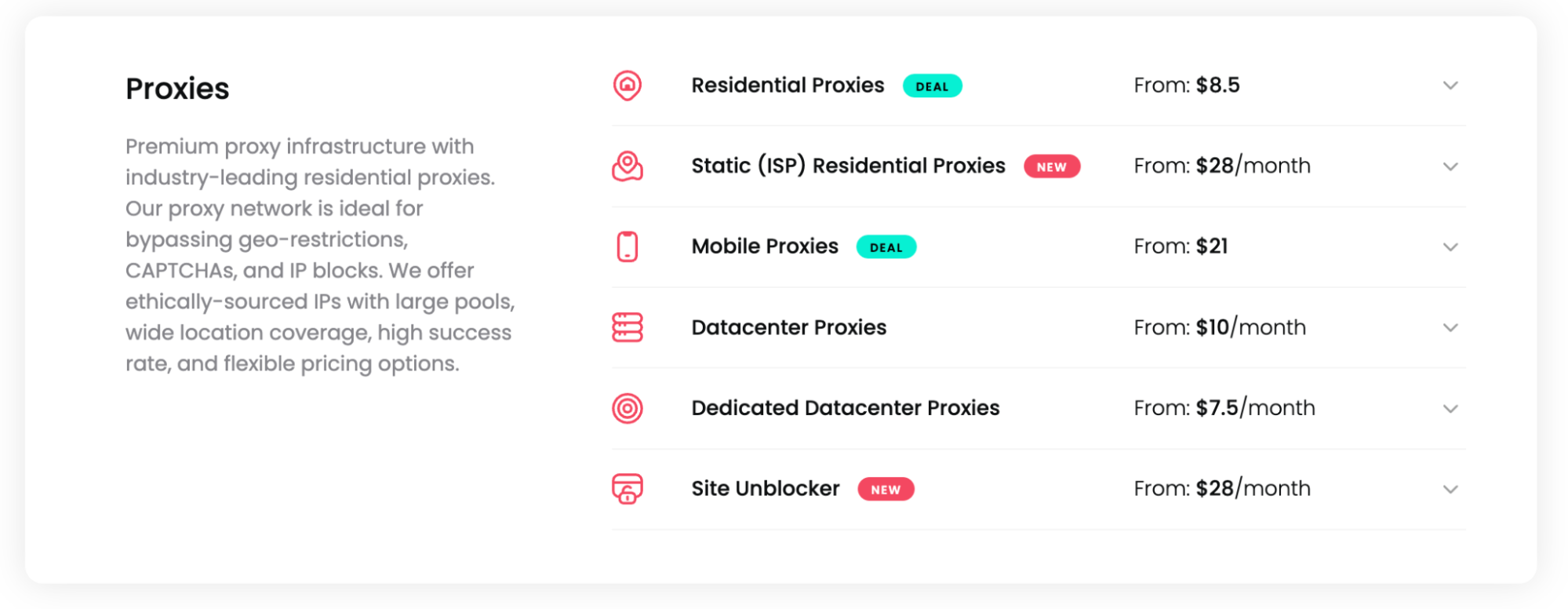
Prices shown are approximate starting rates based on available information. Proxy pricing changes frequently — check Decodo’s current pricing page for the latest figures before purchasing.
| Plan Type | Starting Price | Mid-Tier Price | Key Note |
|---|---|---|---|
| Residential Proxies | ~$8.50/GB (1GB) | ~$6.00/GB (25GB) | 99.47% success rate; best for scraping |
| Static Residential Proxies | ~$14.00/GB (2GB) | ~$13.00/GB (7GB) | Fixed IP; ISP + datacenter hybrid |
| Mobile Proxies | ~$21.00/GB (1GB) | ~$18.00/GB (10GB) | Real mobile IPs; 99.9% uptime |
| Datacenter Proxies | Low per-IP pricing | Scales with pool size | Sub-0.3s speed; best for high-volume tasks |
| Dedicated Datacenter Proxies | Per-IP pricing | Scales with IP count | Exclusive IPs; SOCKS5 + HTTP(S) |
| Site Unblocker | ~$14.00/GB (2GB) | ~$11.00/GB (25GB) | 100% success rate; no config needed |
| Scraping APIs | From ~$50/month | Scales with request volume | SERP, eCommerce, Social, Web |
All plans are billed monthly based on bandwidth usage (per GB) or request volume, depending on the product. There is no annual billing discount. Datacenter and dedicated datacenter proxy pricing is structured per IP rather than per GB — check Decodo’s pricing page directly for current per-IP rates, as these change with plan tier.
Free Trial and Money-Back Policy
Based on competitor research, Decodo has offered free trial options for new users. However, trial terms change — what’s available today may differ from what was available when this article was written. Verify the current free trial offer, what proxy types it covers, and whether there’s a money-back guarantee period directly on the provider site before signing up.
How to Set Up Decodo — Step-by-Step Guide
Setting up a proxy service for the first time feels more complicated than it actually is. Follow these five steps and you’ll have traffic routing through Decodo in under 15 minutes.
- Step 1 — Create Your Account: Go to the Decodo website and sign up for an account. If a free trial is available, start there — you’ll get credentials without committing to a paid plan. Confirm your email address and log in to the dashboard. The dashboard is where you’ll manage proxy endpoints, credentials, and usage stats.
- Step 2 — Choose Your Proxy Type and Location: In the dashboard, select the proxy type that matches your use case (residential, datacenter, rotating, etc.). If you need Canadian IPs — for ad verification, geo-testing, or compliance reasons — look for a country or region selector and choose Canada. Verify that Canadian IPs are available on your selected plan before proceeding.
- Step 3 — Get Your Credentials: Decodo will provide you with a proxy endpoint (hostname and port), a username, and a password. Copy these — you’ll need them in the next step. Some plans also support IP allowlisting, where you whitelist your server’s IP instead of using username/password auth. Choose the method that fits your infrastructure.
- Step 4 — Configure Your Client: You can use Decodo with curl, Python, Node.js, browser extensions, or any tool that supports HTTP/HTTPS proxies. Here’s how to set it up with curl and with environment variables:
Using curl directly:
curl -x http://USERNAME:PASSWORD@gate.decodo.com:PORT \
-U USERNAME:PASSWORD \
https://ip.decodo.com/
# -x sets the proxy server address and port
# -U provides your authentication credentials
# The final URL is the target — here we’re checking what IP the proxy is using
# Replace USERNAME, PASSWORD, and PORT with your actual credentials from the dashboard
Using environment variables (useful for scripts and CI/CD pipelines):
export HTTP_PROXY=”http://USERNAME:PASSWORD@gate.decodo.com:PORT”
export HTTPS_PROXY=”http://USERNAME:PASSWORD@gate.decodo.com:PORT”
# These environment variables tell most HTTP clients (curl, wget, Python requests)
# to route all traffic through the proxy automatically
# Set these in your .bashrc or .env file so they persist across sessions
Step 5 — Test Your Connection: Run a quick test to confirm your proxy is working and that you’re appearing from the expected location.
Use an IP lookup endpoint to verify:
curl -x http://USERNAME:PASSWORD@gate.decodo.com:PORT https://ip.decodo.com/
# If the proxy is working, the response will show the proxy’s IP address
# not your real IP — confirm the country matches what you selected in Step 2
# If you selected a Canadian endpoint, you should see a Canadian IP in the response
If the IP shown is Canadian (or whatever location you selected), you’re good to go. If it shows your real IP, double-check your credentials and endpoint URL.
Decodo Speed and Performance
Speed is one of the most important factors when evaluating a proxy service, and Decodo performs well across its product lineup. Here’s what the numbers look like by proxy type:
- Datacenter proxies: Sub-0.3s connection speeds, 99.9% uptime. Best choice when raw speed is the priority.
- Residential proxies: Slightly higher latency than datacenter (typical for residential IPs), but with a 99.47% success rate on protected targets. Rotating proxies maintain consistent throughput even on heavily defended sites.
- Static residential proxies: Faster than rotating residential due to the fixed IP and datacenter-backed infrastructure, with 99.9% uptime.
- Mobile proxies: Latency varies by carrier and region, but Decodo guarantees 99.9% uptime and these IPs have the highest trust scores with mobile-aware platforms.
- Site Unblocker: Adds processing time for JavaScript rendering and CAPTCHA handling, but delivers a 100% success rate on supported targets.
With unlimited threads, unlimited bandwidth, and no connection caps, you won’t hit artificial speed limits on any plan. The performance figures above are based on Decodo’s published specifications and independently reported benchmarks from proxy testing platforms. For the most current benchmark data, Proxyway’s proxy performance tests are a reliable third-party reference.
Decodo Customer Support
Decodo’s customer support is consistently rated as one of its strongest features. The support team is available 24/7 via live chat and email, with live chat response times typically under a few minutes during peak hours. Support covers everything from basic account setup to technical integration questions — if you’re connecting Decodo to a custom scraping pipeline or debugging an API integration, the team can walk you through it.
The knowledge base is extensive: you’ll find setup guides for every proxy type, API reference documentation, integration tutorials for popular tools and frameworks, and troubleshooting articles. Multiple Trustpilot reviewers specifically call out the support team’s technical knowledge and willingness to go beyond scripted responses.
Security, Privacy, and Canadian Compliance
This section is especially important if you’re using Decodo for any business purpose in Canada. Proxy services touch your network traffic, and that means you need to understand exactly what data the provider can see, store, and potentially share.
PIPEDA and Data Residency — What Canadian Businesses Must Ask
PIPEDA — the Personal Information Protection and Electronic Documents Act — governs how organizations in Canada collect, use, and disclose personal information in the course of commercial activity. If your proxy usage involves routing any data that could be considered personal information (user data, customer records, anything tied to an identifiable individual), you need to understand where that data goes and who can access it.
Before choosing any proxy provider, Canadian businesses should ask and verify the following:
- Where are the proxy servers physically located? If your traffic routes through US-based infrastructure, it may be subject to US law (including the CLOUD Act), even if your business is Canadian.
- Does the provider log request data? If yes, what is logged, for how long, and where are logs stored? Ask for a written data processing agreement if you’re handling personal data.
- Does the provider have a privacy policy that addresses Canadian users specifically? Look for PIPEDA references or a Canadian data processing addendum.
- Are Canadian IPs available? If you need to keep data flows within Canada for compliance, you need to confirm that your traffic is routing through Canadian endpoints — not just appearing to originate from Canada.
- What encryption is used in transit? Confirm that your connection to the proxy uses TLS/HTTPS, not plain HTTP. Plain HTTP proxies expose your traffic to interception.
We want to be clear: we are not making any specific claims about Decodo’s compliance posture. These are the questions you must ask and verify directly with the provider before using their service for any business purpose involving personal data. If the provider can’t give you clear, written answers to these questions, that’s a significant red flag.
Logging Policies and Encryption
A no-logs policy sounds reassuring, but you need to understand what “no logs” actually means for a proxy provider. Some providers log connection metadata (timestamps, IP addresses, bandwidth used) even if they don’t log request content. Ask specifically: what data is retained, for how long, and under what circumstances would it be shared with third parties or law enforcement? For Canadian businesses, this question is not optional — it’s a basic due-diligence requirement.
How Decodo Compares to Competitors
Decodo sits in the mid-market tier — more affordable and accessible than enterprise providers, but with a larger IP pool and more product depth than most budget options. Here’s a quick comparison of the key differentiators:
| Provider | IP Pool Size | Residential Starting Price | Best For |
|---|---|---|---|
| Decodo | 100M+ IPs | ~$8.50/GB | SMBs, developers, SEO pros |
| Bright Data | 150M+ IPs | ~$10.50/GB | Enterprise, large-scale scraping |
| Oxylabs | 100M+ IPs | ~$15.00/GB | Enterprise, dedicated support |
Decodo’s pricing is generally more competitive than Oxylabs for comparable residential proxy access, and its onboarding is significantly simpler than either enterprise alternative. Bright Data offers a larger pool but at a higher price point. For most Canadian businesses and developers who don’t need dedicated account management, Decodo is the more practical starting point.
Final Verdict — Our Decodo Review Recommendation
This Decodo review comes to a clear conclusion: for most Canadian developers, SEO professionals, and small-to-mid-size businesses, Decodo is one of the best-value proxy services available. The combination of a 100M+ IP pool, 99.47% residential success rate, unlimited threads, and a genuinely easy-to-use dashboard makes it a strong default choice for web scraping, geo-targeting, and data collection workflows.
The trade-offs are real but manageable. Residential proxy pricing is higher than budget alternatives at low bandwidth tiers, and there’s no annual discount to offset long-term costs. If you need VPN-style encryption or a dedicated enterprise account manager, look at Bright Data or Oxylabs. But if you want a reliable, scalable proxy service that you can get running in under an hour, Decodo is the right call.
Hosting Canada Rating: 4.5 / 5