Advertising disclosure
Hosting Canada is community-supported. We may earn a commission when you make a purchase through one of our links. Read Disclosure.
Best VPN for Canada in 2026: Secure, Fast & Reliable Picks





 Looking for the best VPN in Canada? We've reviewed the top options for you.
If you’re looking for the best VPN in Canada, you’re likely aware of how important online privacy has become—especially here at home. As more of our lives move online, the risks of cybercrime continue to grow, even in cities known for their safety, like Ottawa.
While we might not worry too much about break-ins, identity theft and digital surveillance are real concerns for Canadians. This makes choosing the best VPN in Canada more important than ever. A reliable VPN helps protect your personal information, keeps your online activity private, and can even improve your access to global content without sacrificing speed or security.
Whether you’re working remotely, streaming, or simply browsing, investing in a top-rated VPN for Canada is a smart move for anyone serious about protecting their digital footprint.
Do You Need a Canadian VPN?
Is it worth the expense of signing a contract and taking on another monthly bill? I would say it is if you travel beyond your home province, access medical records and accounts online, own IoT devices, or perform online financial transactions. Using one of the best VPNs helps protect you from malicious third parties, hackers, and other types of online intrusions.
Best Canadian VPN Reviews
We believe in giving our readers the facts. When evaluating the best options for Canadian consumers, we looked at several factors:
If you want a detailed breakdown of these, scroll to the bottom.
- Security and privacy features
- VPN Protocol used - L2TP vs IPSec vs PPTP
- Speed that doesn't sacrifice security.
- Data leakage protection
Now, on to the VPNs!
- No logs policy
- Support for Netflix and torrenting
- Responsive support and wide knowledge base
- Value pricing
1. NordVPN – The Best VPN in Canada
Key Features

Pros
Cons
While it may be more expensive than some providers, NordVPN is still competitively priced, overall. You get a ton for your money including unlimited bandwidth, a massive server network, top-tier security features, and blazing fast speeds.
With NordVPN, you get the highest value-to-price ratio of any other VPN in Canada we’ve tried. They tick every box and their user interface is the easiest to use.
When you choose NordVPN in Canada, you’re getting high-level security at a great price, and the highest number of servers and locations, which will ensure speedy connections. This is especially nice for customers who are geo-blocked from streaming services and torrenting, and it’s great for use on the road.
Security and Speed
The top feature of NordVPN would have to be security. This service comes with a double data protection protocol that works by relaying your data through encryption on two servers as it passes through the network. This extra step makes sure that your information is masked from any spies or intruders.
Never, during any test, have we found NordVPN to be a data leaker. This is the second biggest concern when using a virtual network. Best of all, their location under Panamanian jurisdiction means they’re able to honor their strict no-log policy. Even if you’re living in Canada with its strict legal system, the government can’t force NordVPN to provide your information or activity.
As for VPN encryption protocols, they use NordLynx (an in-house developed protocol based on Wireguard), OpenVPN, and IKEv2/IPsec.
Pricing and Plans
Like many services, Nord offers a 30-day money-back guarantee. That makes it easy to try before you buy and make sure NordVPN Canada is the right fit.
| Monthly Rate | 12 Month Rate | 24 Month Rate |
|---|---|---|
| $12.99-17.99 | $4.99-8.99 | $3.39-7.39 |
Note that the longer you commit, the better the price, which is extremely common for all VPN providers and it’s a chance to make your money really stretch.
Also, nearly all VPN providers will have a lower introductory price and then significantly higher prices when you renew. Many of them auto-renew too, meaning you may not see this financial slap coming your way if you aren’t prepared.
Customer Support
NordVPN support is available 24/7 through live chat and knowledgeable agents. You can also contact them through email.
Plus, there’s a comprehensive FAQ section on their website and a range of tutorials.
Compatibility
This service offers a high level of compatibility, and installing it on any device is a breeze. No matter which OS you’re using, the apps will still work without a glitch.
2. Surfshark: Best Budget Choice
Key Features

Pros
Cons
We’ve found a very close number two in Surfshark that any Canadian would be happy to use.
This company has built quite a reputation in its fairly short life. They offer the speed and security we want at the right price.

Security and Speed
One drawback is the unreliable speed from the server to the server. Some are super-fast, while others are only average. However, the average speed is fairly consistent when compared to devices without a VPN attached.
Where this company really shines is its security. It has, hands down, the strongest encryption available on the VPN market today. For those who get hyped by tech details, you’ll find a lot to love about SurShark. They use Wireguard, IKEv2, and OpenVPN protocols. They also offer advanced features such as Kill Switch, Dynamic MultiHop, Bypasser, and CleanWeb.
On top of military-grade 256-bit AES encryption, they layer a SHA512 authentication hash and a 2048-bit DHE-RSA key exchange. That’s in addition to WebRTC and DNS leak protection.
Pricing and Plans
When it comes to pricing, Surfshark is a mixed bag. Month-to-month fees are actually higher than NordVPN, but if you commit to a longer contract, you get great savings.
| Monthly Rate | 12 Month Rate | 24 Month Rate |
|---|---|---|
| $15.45-$20.65 | $3.19-6.09 | $1.99-4.29 |

| Monthly Rates | 12 Month Rates | 24 Month Rates |
|---|---|---|
| $12.95 | $6.67 | $4.99 |
They also have an add-on option for a dedicated IP, but it is an additional subscription cost.
Customer Support
You’ll be pleased with ExpressVPN’s solid customer service. The live chat is responsive and friendly. In fact, it was the best of the bunch. Support is available around the clock, or you can contact the company via email for quick response in non-emergency situations.
Compatibility
ExpressVPN is compatible with Linux, Windows, Mac, iOS and Android, and it also has browser extensions as well.
4. IPVanish: Best Non-Canadian VPN
Key Features
Pros
Cons
IPVanish is one of the oldest VPN services on the internet, launching back in 1999. It’s as solid as you’d hope an established company would be.
There were no areas where it stood out from the competition, but there were very few things we could find wrong with it, either.
One great feature of this VPN is the ability to connect unlimited devices simultaneously, making it ideal as a family plan.
But, several servers wouldn’t unblock Netflix for us, and they were located within the IPVanish jurisdiction. Other than that, this is generally a middle-of-the-road, basic service.
Security and Speed
In the past, IPVanish was infamous for handing over customer information to the United States Department of Homeland Security.
This is an example of why you should choose a company located outside of the Five Eye Nation Alliance.
Generally, companies located in the US and other English-speaking countries can force providers to hand over your information and location in the name of security.
However, IPVanish has since come under new ownership and promises a strict no-log policy, which has been verified by third-party audits.
On the speed side, they have plenty of servers and locations to keep your best VPN experience fast and responsive. As of this writing they have 140+ geographical locations, 2400+ servers, unlimited bandwidth, and 40,000+ IP addresses.
Pricing and Plans
IPVanish is competitively priced, at least for initial contracts. Like most VPN providers, the longer you commit, the better your monthly price will be. There is also a 30 day money back guarantee.
| Monthly Rates | 12 Month Rates | 24 Month Rates |
|---|---|---|
| $12.99 | $3.33 | $2.19 |
Customer Support
You can reach customer support via 24/7 live chat. IPVanish also provides added value through a robust support center with email support, an FAQ section, regular system status reports, and an extensive knowledge base.
Compatibility
IPVanish is compatible with Windows, macOS, Apple TV, Fire TV, Android, iOS, Chrome OS, visionOS, and Linux.
5. CyberGhost: Great for Basic Functionality
Key Features

Pros
Cons
CyberGhost is a great budget option, and they have close to 4,000 servers located all over the world.
You’ll also get the best features for the lowest price on our list. Adding to the “wow” factor is the ability to connect with any device and reliable performance.
They may not be the best VPN in Canada, but they make up for some shortcomings with their high-end features.
Security and Speed
With CyberGhost, you’re not going to get super speedy connections, but most of the time they are plenty fast for your needs.
You also don’t have to worry about them keeping your information, leaking data, or risking some of the other security faux pas that other cheap VPN services are known to experience.
CyberGhost also provides AES 256-bit encryption, IKEv2, OpenVPN, and WireGuard protocols.
Pricing and Plans
CyberGhost is available on three tiers of service. They also have the longest term for their money-back guarantee; you can try it for 45 days, depending on the plan you choose.
| Monthly Rates | 6 Month Rates | 24 Month Rates |
|---|---|---|
| $12.99 | $6.99 | $2.19 |
Customer Support
Our only problem with customer support is that it might take a while for them to get back to you.
The good news is, there should be little reason to need support due to its solid performance. Another great support is an extensive knowledge base of how-tos and tutorials.
Compatibility
CyberGhost is easy to install on your router, and there’s an app for any need. This is one of the main standouts of this VPN; the other is their price. You can also connect up to seven devices, which is reasonable for a VPN service.
What is a VPN and Why Do You Need One?
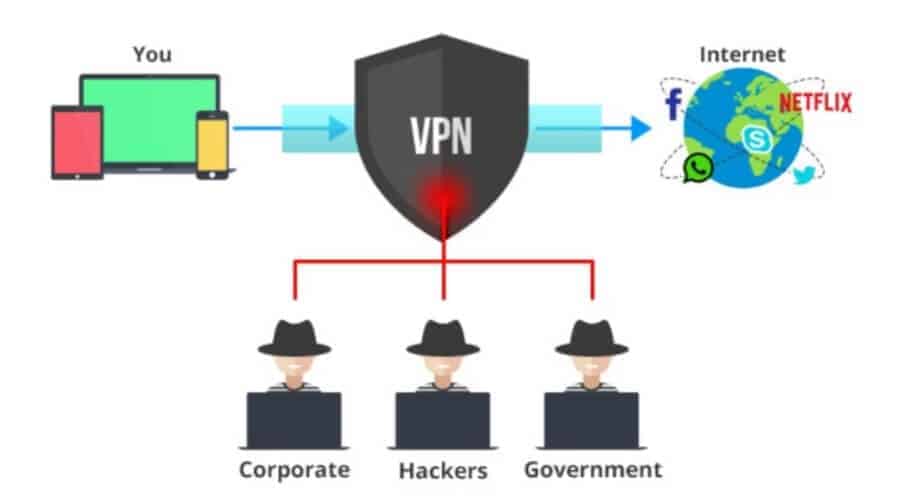
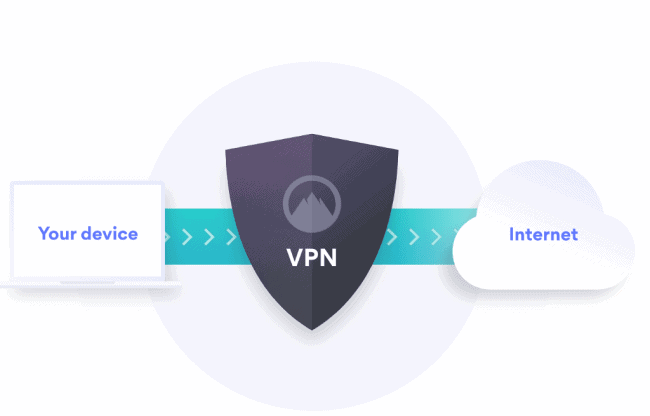
Virtual private networks are servers that any device — such as a computer, Android phone, or tablet — can use to connect to the internet securely. When you turn on a VPN, all your internet activity is transferred via an encrypted tunnel. The data never leaves the encrypted route.
This keeps your web traffic anonymous to increase privacy and security. The best VPN will bolster your device with high-level encryption to protect your data as it’s routed through the VPN server. VPN networks also spread their servers across the globe so users can find a close network to speed up their connection or bypass geo-blocking.
Since 2017, internet service providers in Canada are allowed to sell your personal information to third parties. Some are even legally obligated to collect metadata from users, including your name, address, date of birth, and email addresses.
Canadian citizens should also be aware that Canada is part of several alliances that allow government spying and information sharing amongst each other.
One is the Five Eyes Alliance of the native English-speaking countries, Canada, the US, the UK, New Zealand, and Australia. Canada is also part of the 14 Eyes Alliance that includes the Five-Eye nations plus several European countries.
To block them from collecting your sensitive personal data and to prevent malicious cyber-attacks, you need a VPN.
Now that you know what a VPN is and why you need one, the following sections will dive deeper into how it all works.
Encryption Protocols
 A VPN Protocol is a set of instructions and processes between the VPN server and the VPN client used to make a strong and secure connection. Some common examples are:
- OpenVPN
- PPTP
- SSTP
- L2TP/IPSec
- IKEv2
Here’s a bare-bones overview of each:
- OpenVPN: The OpenVPN Open-Source project is made with businesses in mind. This industry-standard protocol creates fast and secure VPN connections.
- PPTP: Designed for dial-up connections in the '90s, Point-to-Point Tunneling Protocol (PPTP) is one of the oldest protocols. Its simple encryption can be quickly cracked, making it very unsecure. However, it delivers fast data speeds for those not needing strong encryption.
- SSTP: Secure Socket Tunneling Protocol is one of the most popular because it’s been fully integrated with every Microsoft OS following Windows Vista SP1. While you can use SSTP on Mac OS and Linux, configuring it can be difficult. SSTP uses 2048-bit SSL/TLS certificates and 256-bit SSL key encryption, bolstering security.
- L2TP/IPSec: Layer 2 Tunnel Protocol is a substitute to PPTP. As it does not offer any privacy or encryption right out of the box, L2TP is typically paired with the security IPSec VPN protocol.
- IKEv2: Developed in the ‘90s, Internet Key Exchange version 2 (IKEv2) is a widely used VPN tunneling protocol that offers a secure key exchange session for extra security. It is typically paired with the security protocol IPSec. IKEv2 is an excellent protocol for mobile devices.
VPN Routers & Devices
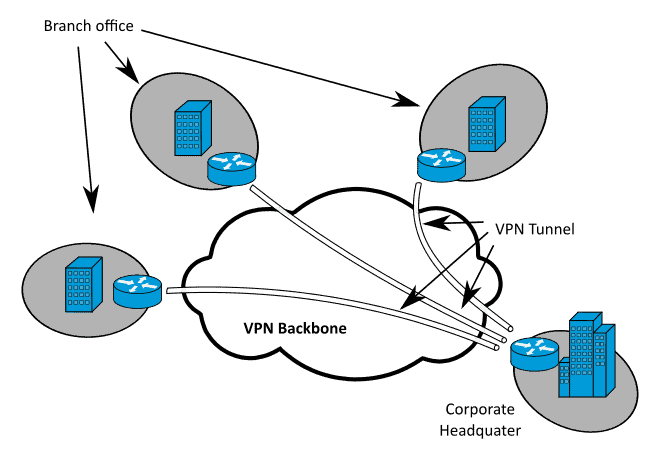
 Here’s a quick overview of how your data gets routed through the virtual private network through routers and devices.
- Provider-Provisioned VPN Building-Blocks: PPVPN is a device regularly used by businesses to allow staff secure remote access to the company network. This relatively new technology uses multiple virtual traffic links called “tunnels” that work on either Layer 2 (L2) or Layer 3 (L3) of the Open Systems Interconnection (OSI) Layers. The VPN devices below can either operate in L2, L3 or both layers.
- PE Devices: A Provider Edge (PE) device is essentially a router that deals with both the Consumer Edge (CE) device and Provider (P) backbone devices — routers we will be discussing shortly. Considering PE routers must interact with both CE and P devices, they are located at the edge of the Network Service Provider (NSP) core.
- P Devices: Compared with provider edge routers, the previously mentioned Provider (P) backbone devices sit inside the network service provider core, as opposed to the edges. P devices are located at the core so that they can connect directly to provider edge devices, rather than CE devices.
- CE Devices: A Consumer Edge (CE) device is a router located at the edge of a customer’s network that provides direct access to the Provider-Provisioned VPN (PPVPN). CE devices are also often known as CPE (Customer Premises Equipment) devices
- C Devices: Unlike any of the other devices in this section, Customer (C) devices are found inside a customer’s network and not connected to the SPN. As this is the case, they are not aware that the VPN even exists.
- User-Visible PPVPN Services: If you’re curious about what a PPVPN (Provider-Provisioned VPN) has to offer, seek no further. In the section below, we have conveniently listed the main features that Provider-Provisioned VPN users can take advantage of.
OSI Layer 2 Services
- VLAN: A Virtual LAN (VLAN) is a subnetwork used to group together a range of devices found on separate LANs (Local Area Networks). Virtual LANs are often used by large companies to improve traffic management and overall network performance by grouping devices together. They provide a higher level of control and security on large networks.
- VPLS: A Virtual Private Local Area Network Service (VPLS) lets customers develop a LAN structure that connects geographically separate sites. All services look as if they’re on the same logical local area network, regardless of their physical location.
- EoIP: Ethernet-Over IP Tunneling (EoIP) is a protocol used to develop an ethernet tunnel between two separate routers. The tunnel could run over PPTP tunnel, IPIP tunnel or other connection types able to transport IP.
- IPLS: IP-Only LAN Services (IPLS) are capable of interconnecting multiple systems across a metropolitan-area (or wide-area) network, making it look as though they are on a private LAN service. Basically, IPLS is a simplified version of a virtual private local area network service.
- PW: A pseudowire (PW) emulated the process of a transparent wire, point-to-point connection across a PSN (Packet-Switching Network).
OSI Layer 3 VPN Services
- MPLS VPN: A multiprotocol label switching VPN, is a family of techniques that utilises multiprotocol label switching methods to create a VPN. In a multiprotocol label switching network, you will often find provider edge routers, provider routers, and customer edge routers.
- Unencrypted Tunnels: Occasionally, a VPN may use tunneling protocols that lack encryption for protecting data. In this instance, a Generic Routing Encapsulation (GRE) is utilized for security.
Private vs Public Encryption Keys
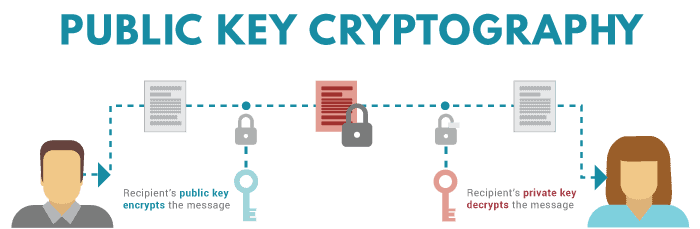
Every VPN service uses two types of encryption keys: public and private.
Public keys are visible to every client on the same VPN network. For safety reasons, in public key cryptography, more than one key is used: one for decryption and one for encryption.
Private keys are only known to the server and the client and are much faster than public keys.
When it comes to block size, both public and private Advanced Encryption Standard (AES) and Triple Data Encryption (3DES) keys are measured in bits and differ in length between 128-bits and 256-bits.
Although 3DES has a total encryption key length of 168-bits, it only offers a fixed key strength (security) of 112-bit.
AES, a method now used by the United States government, has three distinct key lengths: 128-bit, 192-bit and 256-bit.
How Does a VPN Compare With a Proxy Server?
Much like a virtual private network, a proxy server is a hub between the client (you) and the internet that works like a secure web filter and firewall.
One of the key differences is that while the best VPN is capable of unlocking geo-restricted sites and censored content, proxies automatically forward your traffic to a site when surfing the web — hence the name “forward proxies.”
Below, we have listed the three most common proxy protocols (servers) that you’ll have most likely come across when browsing the web.
Buyer’s Guide
When choosing a VPN provider, look for the following must-have features:
Security
Security should be your top requirement in a provider. In our opinion, NordVPN is the safest network due to its key security features. Remember, a VPN provider should NOT:
- ☑️ Store or track IP addresses
- ☑️ Record timestamps for connections and disconnections
- ☑️ Collect personal information or track your browsing activity
- ☑️ Store, share, or sell any of your data or give out information about your online activity
Speed
Next, you want a fast connection. The download speed is usually measured by megabits per second (Mbps).
The higher this number, the faster your download or video stream. Your distance from the server also affects how fast pages load.
Jurisdiction
Where the VPN company is physically located could affect your privacy and security. Some governments can force the company to give them your identifying information and data.
Leak Protection
Data leaks and breaches can happen if your real IP address is exposed. Make sure that your VPN service offers DNS leak protection and is properly configured. Some providers also perform leak monitoring.
Related Read: What is DNS.
Good for Streaming in Canada?
Some streaming services involve file sharing, also called torrenting, and others block content even if you have a legitimate account.
Using a VPN hides your location and activity so you can enjoy the content you want to see from anywhere without hassle.
Masking
You might come across the term “obfuscation.” This simply means the network’s ability to mask your IP address, location, and online activity.
One of the advantages of using a VPN is its ability to protect you from government surveillance and spying.
This is useful whether you want to enjoy Netflix streaming while you’re away on vacation or you live in/visit countries that oppress citizens or block web content.
Network
Since speed and geo-blocking are two elements that can affect your service, choose a VPN with a large number of servers and locations.
Features
Features range from security protocols to bandwidth. Look for AES-256 encryption, SSL certificates, OpenVPN, PPTP, and Tunnel Protocol.
An important feature is a kill switch that allows you to disconnect immediately with a mouse click.
This is useful if, for some reason, you become disconnected from the VPN and your identity is in danger of being exposed. .
Best Cheap VPNs in Canada: Affordable Options for Users
Some VPNs are more affordable than others, but that doesn’t necessarily mean it’s because they’re missing features or quality. Aspects like low initial prices, more streamlined VPN tools, longer subscriptions, and fewer extras can all mean you get a great VPN at a low price.
These affordable options are perfect for users with simplistic needs who want robust VPN functions without all the unnecessary bells and whistles that they probably wouldn’t use anyway. However, it is important to choose a provider who doesn’t skimp on speeds, security practices, and reliability.
Here are three of our favorite platforms who combine great prices with great functionality.
CyberGhost: A Popular Pick Among VPN Users
- Pricing: Introductory prices range from $2.03 to $12.99/month
- 45-day money back guarantee
- 10-Gbps servers
CyberGhost is a great option for budget-conscious VPN users. They have all of the strong privacy and security features you would expect from a service, such as industry leading encryption, no-logs, and fast speeds. All for a very affordable price. They also have dedicated IPs and features for gamers who want to enjoy low-ping/low-lag online gaming.
Private Internet Access (PIA): Strong Security
- Pricing: Introductory pricing from $1.98 to $11.95/month
- Free email breach monitor
- Unlimited simultaneous connections
PIA is a strong contender for the best cheap VPN, especially for security-minded users. They have 100% open-source software, customizable encryption settings, advanced split-tunneling, ad-blocking, and even anonymous payment options available. They have all of the functions and features of a great VPN at a fraction of the price. Hard to go wrong.
VyprVPN – All-Around Solid Option
- Pricing: Introductory prices range from $3.00 to $5.00/month
- Proprietary Chameleon Protocol for overcoming censorship
- P2P options
VyprVPN is one of our favorites for beating strict VPN censorship, thanks to their Chameleon Protocol. They also have tons of useful VPN features, such as split-tunneling, DNS leak protection, high-speed streaming, and a third party audited no-logs policy. You really can do pretty much anything with this provider, and the price is more than fair as well.
What Is the Best Free VPN in Canada?
Free VPNs should be approached with caution. The fact is technology costs money. There aren’t many businesses that can afford to offer you reliable service and lots of features without getting the money out of someone. Because of this, they often sell your data to a third-party, where it will be used for marketing or something more nefarious. They could also just bombard you with ads.
Totally free VPNs are about 70 percent slower than paid services due to all of the traffic on a limited network.
Rather than take risks with free VPNs, there are plenty of affordable options that offer solid service. Just remember that you’ll get what you pay for in terms of privacy and security.
While it’s ultimately up to you, we highly recommend a paid service if you want access to unlimited data and all the best features. Unfortunately, using a free VPN does come with a certain amount of risk.
That said, you can try out all of the VPNs on our list with their various money-back guarantees. Just be sure to get your refund before the refund time period ends, and it will be the equivalent of using their VPNs for free, at least temporarily. This way, you can decide if you like one service more than the other and if you feel it is worthwhile to spend the money on one of these providers.
If you’re just dying to use an actually free service, you may have some luck with Windscribe. Here’s a quick overview.
WindScribe – Free Option But Limited Speeds
Key Features

Pros
Cons
Despite being newer and limited in reach, this company shows promise. They cater to their customers by providing incentives, and they support a range of devices. They’ll also give you a free ad blocker and a built-in firewall for extra protection.
This is one of the few best free VPNs that offer a completely free service without skimping on speed, security, or service. You can even sign up without an email and pay anonymously. Speaking of paid, there are lots more features for pay-to-use plans. Prices start at $9.00 USD per month or $5.75 per month for a 12 month commitment.
Free VPNs vs Paid: What’s the Difference?
Unreliable free services have been known to limit the amount of data you can use, restrict the overall functionality of their apps, or even sell your private data to third parties. That is why it’s best to stick to the well-known, reputable services, like the ones that we have detailed in our top list. However, here are some pros to both free VPNs and paid VPNs, to help you decide.
Advantages of free VPNs include:
- Budget-friendly way to protect your online privacy
- They unlock access to essential features, like encrypting your connection and masking your IP address without the added costs
- Many free VPNs are designed to be user-friendly. You can download and install these top VPN apps in minutes, even if you’re not tech-savvy
Advantages of using paid-VPN services include:
- More gigs
- Higher bandwidth
- Better security and encryption
- Advanced features like intrusion/leak detection and prevention
- Blazing fast connections and download speeds
- 24/7/365 support
- Strict no-logging policies that are backed in writing
No VPN is 100 percent safe and anonymous. But we feel that paying a little to increase the odds that you and your information are protected is worth the price.
Legal Considerations for VPNs
Is Using a VPN Legal in Canada?
Canadians have been able to legally enjoy the protection of VPN services for a while now, and nothing has changed. In fact, they’re recommended by security experts for online privacy protection. The only time you might get into trouble is if you use a VPN to commit illegal acts.
Canada is one of the countries that can force VPN companies to provide law enforcement and government agencies with user data on request. You should also know that using a VPN in Canada could violate the terms of service for some streaming platforms like Hulu and Netflix.
Are VPNs safe?
For the most part, VPNs are perfectly safe and legal.
The only time there is some risk involved is if you use them to get around the law, such as accessing or downloading copyrighted materials without permission or performing an illegal activity. For more about safety, read my articles about free Canadian VPNs and why to avoid them!
Best VPNs for Common Uses
Depending on what you need a VPN for, there may be some providers better suited to your specific needs. Here’s our thoughts on what VPNs are best for particular uses:
- Best VPN in Canada for torrenting: Surfshark or NordVPN. These both support torrenting, are fast and responsive, and have robust privacy measures in place to keep your online activities anonymous.
- Best VPN for Android devices: IPVanish. While most major VPNs have apps for various smartphones, IPVanish’s Android app includes loads of great features, some unique to this service, and makes it easy to connect to a specific country, city, or favorite location.
- Best VPN for iOS devices: While it’s hard to go wrong with any of our VPN favorites, CyberGhost is particularly well suited for iPhone and Apple devices. They have developed native apps specifically for iOS and macOS, making it easy to use on the go with their user-friendly interface.
- Best for streaming geo-restricted content: ExpressVPN is particularly well-suited for unblocking Netflix or other geo-blocked content. As streaming services are cracking down on VPN use, this is a major factor when choosing a provider.
Conclusion
Hopefully at this point you have a better understanding of VPNs, why they are important, and how they work. Our recommended list of favorites are especially well-respected in the industry, so it’s really hard to go wrong, no matter which you choose.
Just pay attention to factors like what device or activity you’ll use it with most, what extra features you want (like ad blockers), and what your budget is, especially if you need to factor in renewal pricing in the future.
Frequently Asked Questions
- Is it legal to use a VPN in Canada? Yes. VPN use is completely legal in Canada. Canadians commonly use VPNs to protect their privacy, secure their data on public Wi-Fi, or access region-specific content. Illegal activities remain illegal regardless of whether a VPN is used.
- Why do Canadians need a VPN? Canadians often use VPNs to enhance online privacy, prevent ISPs from tracking browsing habits, bypass geo-blocked content, and secure data on public networks. A VPN also helps protect against cyber threats by encrypting internet traffic.
- Which VPN has the most Canadian servers? Several major VPN providers offer multiple server locations in Canada. NordVPN, CyberGhost, and PIA (Private Internet Access) are known for having large Canadian server networks, often with servers in cities like Toronto, Vancouver, and Montreal.
- Can a VPN improve streaming in Canada? Yes. A VPN can help bypass geo-restrictions to access U.S. and international content libraries on platforms like Netflix, Hulu, and BBC iPlayer. However, performance varies by provider, so choosing a VPN known for strong streaming support is essential.
- Do VPNs slow down your internet speed? A VPN may slightly reduce speeds due to encryption, but premium providers typically offer fast, optimized servers. In many cases, users don’t notice a difference, especially when connected to nearby Canadian servers.
- Which VPN is best for Canadians traveling abroad? For Canadians abroad, a VPN with reliable Canadian servers is ideal so you can access home-based websites, banking services, and streaming platforms. ExpressVPN, NordVPN, and Surfshark are typically strong choices for international use due to their global coverage and stability.